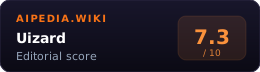
Uizard is an AI-first UI design tool that generates editable mobile and web mockups from a text prompt, a screenshot, or a hand-drawn sketch. The flagship feature is Autodesigner 2.0, which uses a conversational prompt flow to create and iterate sharable prototypes. Screenshot Scanner and Wireframe Scanner handle the reverse direction, converting existing visuals into editable Uizard screens.
Uizard was founded in 2018 out of Copenhagen PhD research into AI-assisted UI generation. Miro acquired the company in May 2024. As of this June 12, 2026 refresh, Uizard still has its own public app, support center, and pricing page at uizard.io, so buyers should treat it as Miro-owned but operationally separate from a standard Miro workspace until their account rep confirms otherwise.
System Verdict
Pick Uizard if you are a non-designer who needs a clickable mockup quickly. Product managers, founders, and engineers get more mileage from Autodesigner 2.0 than trained designers do. The text-to-UI flow is faster than learning Figma from scratch, and the screenshot and wireframe scanners beat manual redrawing for early stakeholder review.
Skip it if your team already lives in Figma or needs a pixel-accurate design system. Uizard’s component model is coarser than Figma’s, design tokens are limited, and the output quality still needs a pass from a real designer before anything ships to production. Teams with in-house UX talent will find it slower than their existing workflow.
Who pays which tier: Free for tire-kicking at 3 AI generations per month. Pro at $12/month billed annually for most solo users and PMs with 500 monthly generations. Business at $39/month billed annually for teams needing 5,000 monthly generations, unlimited projects, and brand-kit controls. Enterprise is custom for 15+ seats, unlimited AI generations, AI data SLA language, and design-system setup.
Key Facts
| Owner | Miro (acquired May 2024) |
| Flagship feature | Autodesigner 2.0 (text-to-multi-screen mockup) |
| Other AI features | Screenshot Scanner, Wireframe Scanner, Design Assistant |
| Free tier | 3 AI generations/mo, 2 projects, Autodesigner 1.5 only |
| Pro | $12/mo billed annually, 500 generations/mo, Autodesigner 2.0, per-component React/CSS handoff |
| Business | $39/mo billed annually, 5,000 generations/mo, unlimited projects, custom brand kit |
| Enterprise | Custom pricing, unlimited generations, AI data SLA, design-system onboarding |
| Export | PNG/JPG/PDF/SVG; per-component React/CSS in Handoff Mode on paid plans |
| Integrations | Figma-to-Uizard import plugin; no documented direct Uizard-to-Figma project export |
| Public API | None documented |
| Launched | 2018 (Copenhagen PhD spinout) |
What it actually is
Uizard sits between a wireframing tool and a full design editor. The canvas edits like a simplified Figma, but the generation path is AI-first. A text prompt like “fitness tracking app with onboarding, home, and profile screens” can produce a multi-screen prototype that a PM or founder can edit before handing it to a designer.
Autodesigner 2.0 is the core engine on paid tiers. The free tier runs Autodesigner 1.5 and caps AI actions such as project generation, image generation, design review, screenshot scan, and wireframe scan at 3 per month.
The real value is speed-to-first-draft for people who cannot design. A product manager prepping a stakeholder review gets a clickable prototype faster than they could write the spec document. The output is not production-ready, but it beats a whiteboard photo.
When to pick Uizard
- You are not a designer and need a mockup today. Product managers, founders, and engineers get genuine lift from Autodesigner. Figma’s learning curve is steeper.
- You have an inspiration screenshot you want to iterate on. Screenshot Scanner converts PNGs into editable mockups in seconds. Faster than rebuilding in any other tool.
- You have hand-drawn wireframes on paper or a whiteboard. Wireframe Scanner digitizes them with fewer artifacts than general OCR tools.
- You need lightweight React or CSS handoff from a non-code workflow. Paid plans expose React/CSS for individual components in Handoff Mode, which is useful for developer reference but not a full app export.
- You want to validate an idea before hiring a designer. A $12/mo Pro account replaces the first two weeks of a contract designer’s output for idea validation.
When to pick something else
- Mature design team or production design system: Figma. Uizard’s component model is coarser and tokens are thinner.
- AI UI generation with a different exploration model: Google Stitch is better for experimental AI-native canvas work, while v0 is better when the buyer wants React code rather than a mockup.
- Web-specific design and live publishing: Framer AI. Uizard produces mockups, Framer produces live sites.
- Marketing graphics, social posts, or general design: Canva. Different problem, different tool.
Pricing
Pricing via uizard.io/pricing:
| Plan | Price | AI generations/mo | Projects | Who’s it for |
|---|---|---|---|---|
| Free | $0 | 3 (Autodesigner 1.5) | 2 | Tire-kickers, single-screen tests |
| Pro | $12/mo billed annually | 500 (Autodesigner 2.0) | 100 | Most individuals should land here |
| Business | $39/mo billed annually | 5,000 | Unlimited | Teams, agencies, heavy prototyping |
| Enterprise | Custom | Unlimited | Unlimited | 15+ seat orgs needing AI data SLA, design-system setup, and SSO |
Pro adds developer handoff with React/CSS, private projects, all templates, and Autodesigner 2.0. Business adds custom brand kit, faster AI generation, unlimited projects, and priority support. Enterprise adds design-system setup, AI data SLA, custom billing, white-glove onboarding, SSO, and 2FA.
Prices verified 2026-06-12 via Uizard pricing page. Uizard’s support page still uses $19/month as a Pro monthly billing example, but the durable public pricing page emphasizes annual billing for the displayed $12 and $39 rates; verify checkout pricing before buying monthly seats.
Against the alternatives
| Uizard | Figma | Galileo AI | |
|---|---|---|---|
| Text-to-UI generation | Autodesigner 2.0 (strongest for non-designers) | Figma AI (added 2024, weaker) | Primary focus, higher fidelity |
| Screenshot to editable | Yes (Screenshot Scanner) | No native | Limited |
| Sketch to digital | Yes (Wireframe Scanner) | No native | No |
| Design-system depth | Shallow | Deep (industry standard) | Shallow |
| Pixel-accurate editing | Limited | Yes | Limited |
| React/CSS export | Component-level handoff on paid plans | Plugins/dev tools | Limited |
| Starting price | $12/mo annual | $16/mo per editor | $15/mo |
| Best viewed as | AI-first first-draft tool | Production design platform | Fidelity-focused AI generator |
Failure modes
- Output is first-draft quality, not production. Autodesigner mockups need a designer pass before shipping. Component spacing, color contrast, and hierarchy frequently need cleanup.
- Design-system support is shallow. No real design tokens, limited variables, and the component library is prebuilt rather than extensible. Teams with mature systems hit the ceiling fast.
- Generation budgets run out. Free tier’s 3/mo is demo-only. Pro’s 500/mo is workable but heavy prototyping hits the limit. No pay-as-you-go overage.
- Code handoff is component-level, not a full app export. Uizard’s own export help says you can inspect individual components for CSS or React, but cannot export an entire project to HTML, JavaScript, or script. Accessibility, state management, and routing still need manual implementation.
- No public API. Scripted generation or CI integration is not supported.
- Miro ownership does not mean Miro workspace parity. Uizard has joined Miro, but the public product and pricing pages still live on Uizard surfaces. Procurement should verify SSO, workspace, data, and billing expectations for the exact tenant.
- Prompt fidelity varies. Complex UI requirements (multi-step wizards, data-heavy dashboards) produce less usable output than simpler consumer-app flows.
Methodology
This page was refreshed on 2026-06-12 by checking Uizard’s pricing page, Autodesigner page, and help center export docs, with previous scanner, subscription, and Miro acquisition sources retained for context. Scoring follows the four-dimension rubric at /about/scoring/ (Utility × Value × Moat × Longevity, unweighted average). The most volatile fields are pricing, generation allowances, handoff/export scope, and Enterprise data terms.
FAQ
Is Uizard still independent after the Miro acquisition? As of June 12, 2026, Uizard ships at uizard.io with its own public pricing and support docs, while Uizard’s own May 2024 post says it joined Miro. Treat it as Miro-owned but verify exact Miro workspace, billing, SSO, and data terms before procurement.
What is Autodesigner 2.0 versus 1.5? Autodesigner 2.0 (paid tiers only) generates complete multi-screen projects with themes from a text prompt in around 30 seconds. Autodesigner 1.5 (free tier) is the older engine, limited to 3 generations per month with lower fidelity output.
Can Uizard output real frontend code? Pro tier and above expose React and CSS in Handoff Mode for individual components. Uizard’s help center says full-project export to HTML, JavaScript, or script is not available, so treat code output as developer reference rather than production scaffolding.
Sources
- Uizard pricing (verified 2026-06-12)
- Uizard Autodesigner 2.0 (verified 2026-06-12)
- Using Screenshot Scanner (verified 2026-06-12)
- Using Wireframe Scanner (verified 2026-06-12)
- Exporting projects and Handoff Mode (verified 2026-06-12)
- Importing screens from Figma, Adobe, or Sketch (verified 2026-06-12)
- Understanding subscriptions (verified 2026-06-12)
- Uizard joins Miro (verified 2026-06-12)
Review History
- 2026-05-10: Refreshed pricing, Autodesigner limits, handoff/export caveats, Miro ownership language, scanner source support, and visible verification dates.
- 2026-05-13: Reverified all four tiers, AI generation caps, Autodesigner version split, and React/CSS handoff scope against uizard.io/pricing. No material changes.
- 2026-06-12: Reverified Free, Pro, Business, and Enterprise prices, AI generation caps, Autodesigner 2.0 positioning, and component-level React/CSS handoff scope. No material pricing change.
Related
- Category: AI Design